
How do I redeem Keep the Door Locked codes?


Launch the experience, tap CODE on the left HUD under Shop, paste an Active string exactly, then press Redeem.

Keep the door locked redeem codes: launch Roblox, tap CODE on the left HUD, paste ROOM! or VISITS8MIL exactly, then Redeem. Fix fails and case tips.
Launch → CODE on the left → paste → Redeem.
~6 min read
Sponsored
Searching keep the door locked redeem codes? This walkthrough shows the in-game CODE path for Keep the Door Locked by Hotel Room Services (Place ID 124338404742585): launch → left HUD CODE → paste → Redeem. Live strings live on codes. Verified August 16, 2026 · Roblox.
| Fact | Detail |
|---|---|
| Game | Keep the Door Locked · Roblox |
| Redeem UI | In-experience CODE button (left HUD, under Shop) |
| Not here | Roblox website promo / gift-card box |
| Active set | 4 strings · August 16, 2026 |
| Case | Case-sensitive — paste exactly |
| Per account | Each code once per Roblox user |
| Rewards | Cash · Revive Token · Jumpscare Token |
| Official drops | Hotel Room Services Discord · join |
Redeem is not buried in Settings. After you load into the hotel room, look at the left HUD near Shop — the button label is CODE. That is the only panel that accepts Keep the Door Locked redeem strings.
| Place | Works? | Notes |
|---|---|---|
| Left HUD → CODE (under Shop) | Yes | Primary redeem path |
| In-room Shop cash packs | No for codes | Buying packs is separate from redeem |
| roblox.com/promocodes | No | Website box ignores ROOM! / FREECASH |
| Roblox mobile browser gift UI | No | Still need the in-experience button |
Follow this path once per Active string. Tap Copy on the codes list first so you are not typing ROOM! by hand.
| Step | Action | Success signal |
|---|---|---|
| 1 | Copy from the Active codes table | String on clipboard |
| 2 | Launch Keep the Door Locked | Hotel room HUD visible |
| 3 | Tap CODE on the left (under Shop) | Text field opens |
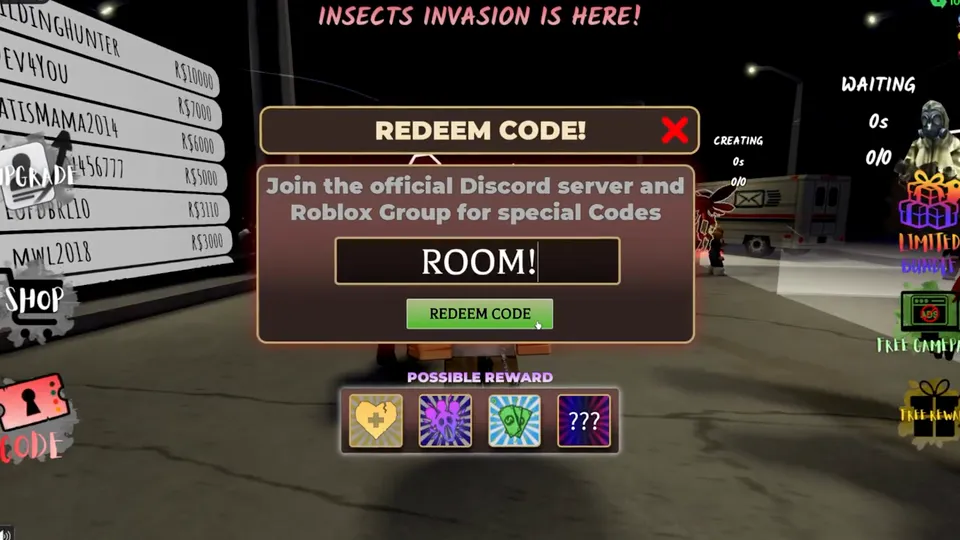
| 4 | Paste exactly → Redeem | Cash / Token toast |
| 5 | Repeat for remaining Active rows | Each succeeds once per account |
ROOM! needs the exclamation mark. VISITS8MIL is one token with digits. FREECASH and FIRST_CODE use exact uppercase. Spaces before or after the string count as a different code.
You can claim FIRST_CODE before ROOM! or the reverse. What matters is finishing all Active rows before you start spending Cash on impulse cosmetics.
Next: which of the four strings you should prioritize when you only have a quiet minute.
If a knock interrupt forces you to pause mid-redeem, prioritize the buffers that save early softlocks.
| Priority | Code | Why first |
|---|---|---|
| 1 | VISITS8MIL | Revive Token + 5000 Cash — best beginner insurance |
| 2 | FREECASH | 5000 Cash pure bank for Sanity / pizza / decode |
| 3 | ROOM! | 3500 Cash starter buffer |
| 4 | FIRST_CODE | 3000 Cash + Jumpscare Token unlock-style reward |
Switching characters on the same Roblox user does not reset redeem history. Alt accounts are separate users — do not expect the same string to work twice on one profile.
Only paste codes that still say Active on our list or on Hotel Room Services Discord. Unverified “new update” chatter expires overnight — the toast in-game is the source of truth.
If Redeem still fails after a clean paste, use the fail table next.
Matched by build plan, shared topics, and guide progression — not random related links.
Most keep the door locked redeem codes failures are clipboard, expiry, or already-claimed — not a broken button.
| Symptom | Likely cause | Fix |
|---|---|---|
| Invalid / failed toast | Typo, wrong case, missing ! | Copy again from the codes page |
| Nothing / already used | Redeemed earlier on this account | Skip — one redeem per user |
| Worked yesterday, fails today | Expired overnight | Re-check codes + Discord |
| Cannot find CODE | Website promo / wrong experience | Left HUD inside Place 124338404742585 |
| Only some codes work | Partial history | Redeem remaining Active rows only |
| Generator / comment codes | Fake strings | Ignore — Discord or our Active table only |
ROOM! ≠ ROOM. VISITS8MIL ≠ VISITS8MIL! FREECASH ≠ FreeCash. FIRST_CODE ≠ FIRSTCODE. Strip leading spaces from mobile paste.
Relog once, confirm you are not in a VIP server with a different build, then ask in Discord only after you can screenshot the exact string and toast.
When Cash finally lands, spend it on survival — not cosmetics.
Redeem is only useful if Cash hits the systems that stop night-one deaths. Pair this with the beginner guide and upgrades.
| Spend | Priority | Notes |
|---|---|---|
| Sanity upgrade | Highest | Sanity 0 ends the run |
| Flashlight | High | Shadow Man and dark corners |
| Spray capacity | High | More threat-control uses |
| Pizza ($150) | Situational | Roach King trigger — not a verified Sanity heal |
| Laptop decode ($300) | Situational | Restore cameras when hacked |
| Revive Token (from VISITS8MIL) | Hold one | Insurance while learning cameras |
| Cosmetics / late QoL | Later | After you stop dying on open mistakes |
Front-loading Cash means a wrong open costs money instead of a full restart. Do not wait until Sanity is already critical to open CODE.
Launch the experience, tap CODE on the left HUD under Shop, paste an Active string exactly, then press Redeem.
Left side of the in-game HUD near Shop after you load into the hotel room — not on the Roblox website.
Yes. Paste exactly as shown. ROOM! needs the exclamation mark.
No — these strings only work in the in-experience CODE panel.
VISITS8MIL for the Revive Token buffer, then FREECASH / ROOM! / FIRST_CODE.
Usually a typo, missing punctuation, expiry, or the code was already claimed on that Roblox account.
Use the Active Copy table on codes (verified August 16, 2026).
Hotel Room Services Discord (invite), then we mirror verified Active rows.
August 16, 2026 · page facts August 16, 2026.
Matched by build plan, shared topics, and guide progression — not random related links.